Hi All
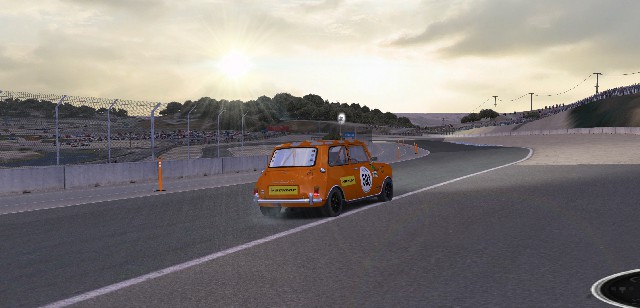
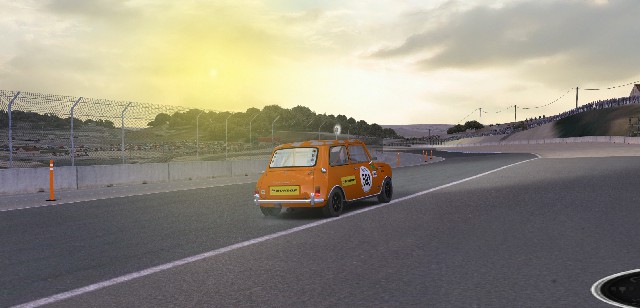
I have been testing during hours the antialiasing and the lens flare effect compatibility.
Lens Flare works properly if you use Nvidia DSR (4k rendering in a FullHD display), but if you are using triple screen or cannot use Nvidia DSR, you must use AA, and my tests determinate that if you activate the compatibility mode with Diablo III in Nvidia Profiler Inspector (also works with Everquest, Warmonger, Assassin´s Creed,...) AA works, but if you mark "override any aplication settings" (wich is what GTR233 says on its mod) the lens flare doesnt work, simply shows a circle in the sky.
So 3 scenarios:
1- "Override any app settings" + Diablo III compatible AA = AA works but there´s no lens flare.
2-"Enhace the app settings" (with them deactivated) + Diablo III compatible AA = AA doesn´t work but lens flare works.
3- "Enhace the app settings" (gtlconfig antialiasing on level 1) + Enhace the app settings (in profile inspector) + Diablo III compatibile AA = AA works and lens flare works.
BTW, I recomend using a combined AA (multisampling + supersampling), for example 8xS (Combined: 1x2 SS + 4x MS) and FXAA activated (helps fences look MUCH better without vibrations).
More or less quantity of AA depending on your graphic card. Press ctrl+F on road to show your frames per second and be sure you get 100 (or more you have 140/240hz screen) in a normal track to be sure it will work at +60fps in every track.
Here you can see the differences on Antialiasing:
(yes, we are not on GTL because of graphics, but the fact that there are no flickers on the tracings (caused by saw teeth) greatly helps concentration in driving):

little bit better quality here:
https://i.postimg.cc/Jh5MGMWj/aa.jpg
On the other way, here it is the 3 options of lens flare with antialiasing on:
Default

with better quality here:
https://i.postimg.cc/wqHsFQ0j/default.jpg
HQ

with better quality here:
https://i.postimg.cc/fM9tNrPb/hq.jpg
PnG style

with better quality here:
https://i.postimg.cc/81d7FrNQ/png.jpg
Hope it helps
byAGM


 Beliebt: 0